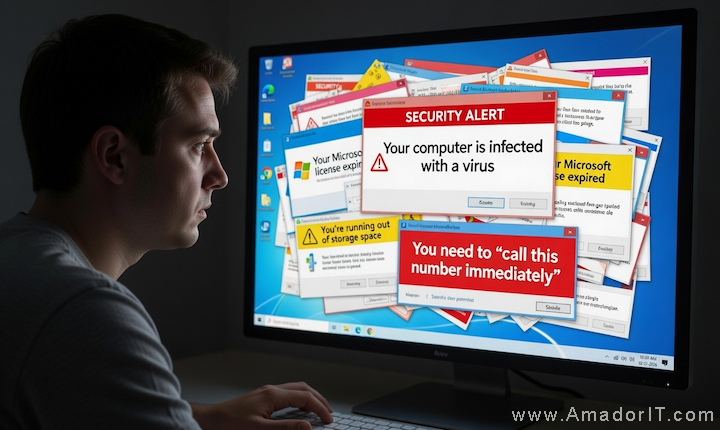
You're browsing the internet and suddenly your screen fills with alarming messages. "SECURITY ALERT: Your computer is infected with a virus!" A phone number flashes on the screen. An urgent voice might even start playing through your speakers telling you to call immediately. Your heart starts racing.
Take a deep breath. It's a scam. Every single time.
What These Fake Popups Look Like
These scam popups are designed to look as official and terrifying as possible. They often use Microsoft, Apple, or Google logos and colors to appear legitimate. Here are the most common ones:
- "Your computer is infected with a virus" — usually with flashing red warnings and fake scan results
- "Your Microsoft license has expired" — claiming you need to call to reactivate Windows
- "You're running out of storage space" — trying to get you to install malware disguised as a cleanup tool
- "Call this number immediately" — the biggest red flag of all
Some of these popups are so aggressive they lock up your browser so you can't close the tab. They might play audio warnings or make your computer beep. They might even make your mouse cursor disappear. All of this is designed to panic you into calling that number.
What Happens If You Call the Number
If you call the number on these popups, here's what typically happens:
- A person answers claiming to be from "Microsoft Support" or "Windows Technical Department"
- They ask you to give them remote access to your computer
- Once connected, they show you normal system files and logs, claiming they're evidence of viruses or hackers
- They tell you the "fix" will cost $200 to $500 (or more)
- In many cases, they actually install malware or steal personal information while they have access
These scammers are convincing. They sound professional. They use technical jargon. They prey on people who aren't sure what's real and what isn't. There's no shame in almost falling for it — these scams work because they're well-designed.
What to Do Instead
If you see one of these popups, here's exactly what to do:
- Don't call the number. Not even to "check if it's real." It's not.
- Don't click anything on the popup. Not even the "X" to close it — sometimes that's a fake button that triggers a download.
- Press Alt+F4 (Windows) or Command+Q (Mac) to force-close your browser.
- If that doesn't work, hold down the power button on your computer for about 5 seconds until it shuts off. Then turn it back on.
- Clear your browser history after restarting so the popup page doesn't reload.
What If They Keep Coming Back?
If you keep seeing these popups even after clearing your browser, you may have adware installed on your computer. Adware is software that snuck onto your system — usually bundled with something else you downloaded — and it generates these fake warnings to trick you into paying for bogus services.
Signs you might have adware:
- Popups appear even when you're not browsing the web
- Your browser homepage changed without you doing it
- New toolbars or extensions appeared that you didn't install
- You're getting redirected to websites you didn't navigate to
- Ads are appearing in places they normally wouldn't
If any of this sounds familiar, it's time to get it cleaned up. Adware can be stubborn to remove on your own, and some of it can lead to more serious security issues if left in place.
How to Protect Yourself Going Forward
- Keep your browser updated. Modern browsers block many of these scam sites automatically.
- Don't download software from random websites. Stick to official sources and app stores.
- Use an ad blocker. Extensions like uBlock Origin (free) block most of these malicious popups before they even appear.
- Be cautious with email links. Many people land on scam popup pages by clicking links in phishing emails.
- When in doubt, ask someone you trust before clicking, calling, or downloading anything.
Already Called the Number?
If you've already called one of these numbers and gave them access to your computer, don't panic — but do act quickly:
- Disconnect from the internet immediately (unplug your ethernet cable or turn off WiFi)
- Change your passwords from a different device (phone or another computer) — start with email and banking
- Contact your bank if you gave them a credit card number
- Get your computer professionally cleaned — they may have installed remote access software or malware that needs to be removed
There's no judgment here. These scams are designed by professionals who do this all day, every day. The important thing is to act fast and get it sorted out.
Need Help?
If you're stuck with popups that won't go away, you're not sure if something on your screen is real or a scam, or you think someone may have already accessed your computer — give me a call. I help neighbors sort this stuff out all the time. That's what I'm here for.